Getting Started with Onebox API
Starting your first integration? Contact our business team to begin the onboarding process:
📧 Business inquiries: channels@oneboxtds.com 🔗 Technical support: API Support Help Center
What is Onebox?
Onebox is the first Global Ticket Distribution System for the entertainment industry. We develop technology to connect live events and activities with sales channels from a centralized all-in-one ticketing platform, empowering sales, profits, and audiences.
APIs to Unlock the Potential of Your Ticketing
Through our powerful APIs, we help your business grow by connecting you to an entertainment marketplace, enabling you to:
- 🌍 Unlock new markets and sell tickets to the best live entertainment shows
- ⚡ Get real-time rates and inventory availability without quotas or limitations
- 🎫 Create barcoded tickets for direct venue access without vouchers
- 🔗 Connect seamlessly to a global network of events and promoters
Our API-First Approach
Our API-first strategy consists of treating the API not as middleware but as a software product that empowers developers, enables partnerships, and accelerates innovation. This is a big shift from integration-first operations in which APIs are typically created and then forgotten.
Being API-first means anticipating that an API may have many use cases and enable numerous business opportunities.
This guide will walk you through the complete integration process from initial contact to production deployment.
🚀 Integration Process Overview
Step 1: Initial Contact & Business Agreement
Contact Our Business Team
Email channels@oneboxtds.com with the following information:
- Company name and brief description
- Type of integration (sales channel, access control, event manager, etc.)
- Expected volume (tickets per month/year)
- Target markets (countries/regions)
- Technical contact information
What Happens Next?
- Our business team will review your request
- Schedule an introductory meeting to discuss your needs
- Negotiate commercial terms and contract
- Once the contract is signed, you'll be onboarded to technical support
The business negotiation process varies depending on complexity. Plan for 1-4 weeks from initial contact to contract signature.
Step 2: Receive Test Environment Credentials
Once the contract is signed, our technical team will provide you with test environment credentials:
Test Credentials Package
You will receive:
| Credential | Description | Example Value |
|---|---|---|
| channel_id | Your unique channel identifier | 123 |
| client_id | OAuth client identifier | seller-channel-client |
| client_secret | OAuth secret / API Key | xxxxxxxxxxxxxxxxxxxxxxxxxxxxxxxx |
| Environment URL | Test API base URL | https://api.oneboxtds.net |
Never share credentials publicly or commit them to version control. Use environment variables in your applications.
Test Environment Access
- Base URL:
https://api.oneboxtds.net - OAuth Token:
https://api.oneboxtds.net/oauth/token - Test data: Pre-configured events and sessions for testing
Step 3: Development & Integration
Quick Start
-
Authenticate - Obtain your OAuth2 access token
-
Explore the Catalog - Search for events and sessions
-
Create Orders - Implement the booking and purchase flow
-
Manage Orders - Handle order details, refunds, and cancellations
Development Resources
- Environments - Test vs Production URLs
- FAQ - Common questions and answers
- Troubleshooting - Common errors and solutions
Testing Your Integration
Use the test environment to:
- ✅ Test the complete purchase flow end-to-end
- ✅ Handle different event types (EVENT, ACTIVITY, PASS)
- ✅ Test error scenarios (sold out, expired cart, invalid data)
- ✅ Verify webhook integrations
- ✅ Test refund and cancellation flows
Most integrations take 2-6 weeks depending on complexity. Ensure you test all scenarios thoroughly before requesting certification.
Step 4: Certification Process
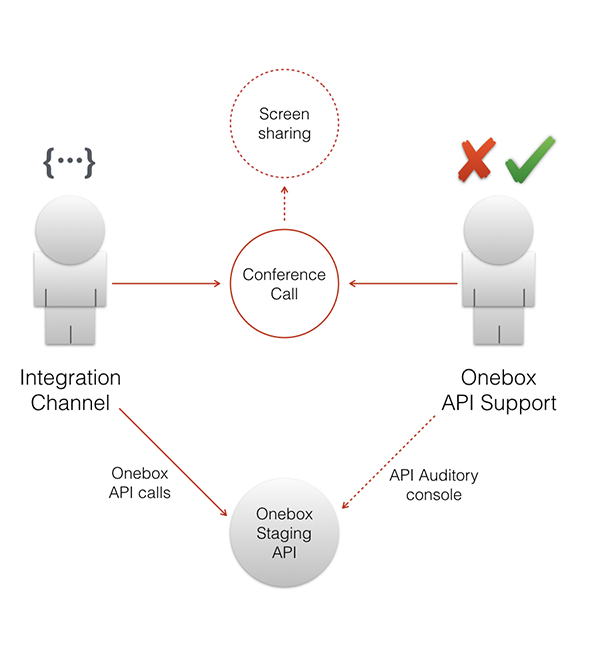
Once your integration is complete and tested in the test environment, you must pass a certification process before accessing production. This is a mandatory step to ensure the quality and reliability of your integration.
What is Certification?
A live video conference where you demonstrate your complete integration flow while our technical team monitors the API calls in real-time using our audit system. This ensures everything is implemented correctly before going to production.
Prerequisites - Before You Request Certification
Ensure you have completed all of the following in the test environment:
- ✅ Complete purchase flow: Search, cart creation, checkout, payment, and order confirmation
- ✅ Error handling: Properly handle all error scenarios (sold out, expired cart, invalid data, etc.)
- ✅ Multiple event types: Tested with EVENT, ACTIVITY, and PASS types
- ✅ Webhook integration: If applicable to your use case
- ✅ Refund/cancellation flows: If you will handle post-purchase operations
- ✅ Demo environment ready: Working integration ready to showcase live
Do NOT request certification until your integration is fully complete and tested. If issues are found during certification, you'll need to reschedule for another meeting.
How to Request Certification
Step 1: Open a ticket at the API Support Help Center
Subject: Certification Request - [Your Company Name]
Ticket must include:
- Your channel_id (test environment)
- Brief description of your integration scope
- Confirmation that you've completed all prerequisites above
- 2-3 proposed dates/times for the video call (include your timezone)
Step 2: Wait for confirmation
Our team will respond within 1-2 business days to confirm the certification meeting date and time.
The Certification Meeting
Duration: Approximately 1 hour
Platform: Google Meet (link provided by Onebox)
What happens during the meeting:
- 📺 Screen sharing: You share your screen to demonstrate your integration
- 🎬 Live demonstration: You perform the complete purchase flow in real-time
- 🔍 Monitoring: Onebox team monitors all API calls in our audit system
- ❓ Q&A: We may ask questions about your implementation
- ✅ Review: We verify all calls are correctly implemented
- Test your integration one final time before the meeting
- Have your test credentials ready
- Ensure stable internet connection
- Prepare to explain your error handling logic
- Be ready to show different scenarios (happy path + edge cases)
Certification Outcomes
✅ Success - Certification Passed
If everything works correctly and all API calls are properly implemented:
- Result: Certification approved ✨
- Next step: Production credentials will be created and delivered
- Timeline: Usually 1-2 business days (sometimes same day)
⚠️ Issues Found - Certification Failed
If there are problems during the demonstration or issues found in the audit system:
- Result: Certification not approved
- Next step: We'll provide detailed feedback on what needs to be fixed
- Action required: Fix the issues and request a new certification meeting
- Timeline: Schedule follow-up after fixes are implemented
- Scheduling: Book 1-2 weeks in advance for availability
- Production credentials: Same day to 2 business days after passing
- Retry: If you fail, you can reschedule after fixing issues
Step 5: Production Access
After successful certification, you'll receive production credentials:
Production Credentials
| Credential | Description |
|---|---|
| channel_id | Production channel identifier |
| client_id | Production OAuth client ID |
| client_secret | Production API Key |
| Environment URL | https://api.oneboxtds.com |
Production credentials access real data and real transactions. Handle with extreme care:
- ✅ Use secure credential storage (secrets management)
- ✅ Monitor error rates and API responses
- ✅ Implement proper logging and alerting
- ❌ Never use test credentials in production
- ❌ Never use production credentials in test
Going Live Checklist
Before launching to customers:
- All endpoints use production URLs (
api.oneboxtds.com) - Production credentials stored securely
- Error handling and retry logic implemented
- Monitoring and alerting configured
- Customer support team trained
- Rollback plan prepared
📚 Next Steps
Essential Reading
- Environments - Understand test vs production
- Authentication - OAuth2 implementation
- API FAQ - Common questions answered
Integration Guides by Use Case
- Sales Channel Integration - Distribution API
- Access Control Integration - Access Control API
- Event Management - Catalog API
Getting Help
- Technical questions: API Support Help Center
- Business questions: channels@oneboxtds.com
- Documentation issues: Report on GitHub
🎯 Success Stories
Our API powers integrations with hundreds of sales channels worldwide, processing millions of tickets annually. Welcome to the Onebox ecosystem!